
Download Vocaldo – Advanced AI Speech‑to‑Text Solution
Overview of Vocaldo
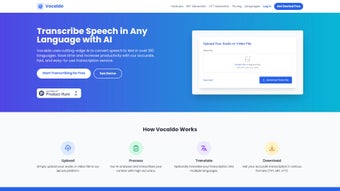
Vocaldo is a cloud‑based Speech‑to‑Text (STT) platform that leverages state‑of‑the‑art artificial‑intelligence models to turn audio and video files into searchable, editable text in over one hundred languages. The service is built for speed, accuracy, and convenience: users simply upload their media, watch a real‑time progress bar, and receive a transcript that can be edited, translated, and exported in multiple formats. Because all processing happens on secure servers, there is no need to install heavyweight desktop software, making Vocaldo an ideal choice for freelancers, media teams, legal departments, and multinational corporations alike.
While the engine performs best with clear recordings, it still delivers respectable results even when faced with moderate background noise or varied accents, thanks to its deep‑learning training on diverse speech datasets. The platform also offers a built‑in translation engine, allowing a single click to generate multilingual versions of any transcript, a feature that dramatically reduces the time and cost associated with traditional translation workflows. Security is baked in: TLS 1.3 encryption protects uploads, and data is automatically purged after 24 hours unless users choose to store it in their personal library.
Whether you need subtitles for YouTube, meeting minutes for global teams, or research‑ready interview transcripts, Vocaldo provides a fast, cost‑effective, and user‑friendly solution that competes with premium desktop alternatives while remaining accessible from any modern browser.
Key Features and Practical Benefits
- AI‑Driven Transcription Engine: Deep‑learning models trained on millions of hours of speech deliver 92‑96 % accuracy on clear recordings, handling a wide range of accents and dialects.
- Support for 100+ Languages: From global languages such as English, Spanish, and Mandarin to niche tongues like Icelandic and Swahili, ensuring true multilingual capability.
- One‑Click Translation: Instantly convert any transcript into another supported language using an integrated neural‑machine‑translation service.
- Multiple Export Formats: Export results as plain TXT, subtitle‑ready SRT, or web‑friendly VTT files, simplifying integration with video platforms and content management systems.
- Secure Cloud Processing: End‑to‑end encryption and compliance with GDPR and CCPA protect user data throughout the upload‑process‑download cycle.
- Bulk Upload Capability: Process large batches of files simultaneously, perfect for agencies handling high‑volume projects.
- Real‑Time Progress Tracker: Visual indicator shows transcription status, estimated completion time, and any quality warnings.
- Future API Access: Planned RESTful API will enable developers to embed Vocaldo’s engine directly into custom applications.
These features translate into concrete benefits for everyday users. Content creators can generate accurate subtitles for YouTube or TikTok videos within minutes, eliminating the need for third‑party caption services. Legal professionals gain searchable transcripts of depositions, hearings, or client interviews without the expense of hiring a transcription firm.
Academic researchers can rapidly turn interview recordings into coded text for qualitative analysis, saving countless hours of manual typing. Enterprises with global workforces can produce meeting minutes in multiple languages, fostering better communication across borders. Because Vocaldo runs entirely in a web browser, it works on Windows, macOS, Linux, Android, and iOS without any additional installations, ensuring that teams with mixed device environments stay productive.
The combination of high‑accuracy AI, extensive language coverage, and built‑in translation makes Vocaldo a versatile tool that addresses the most common pain points in modern transcription workflows.
Installation, Usage & Compatibility
Getting Started – No Download Required
To begin, navigate to the official Vocaldo website and register using an email address or a single‑sign‑on option such as Google or Microsoft. After confirming your account, you are taken directly to a clean dashboard featuring an obvious Upload button. Drag‑and‑drop audio (MP3, WAV, AAC, FLAC) or video (MP4, MOV, AVI, WebM) files, or click to browse your device. The platform automatically detects the source language, but you can manually select a different language if needed. The intuitive interface guides you through each step, ensuring that even users with minimal technical knowledge can start transcribing within seconds.
Transcription Workflow
Once a file is uploaded, the AI engine begins processing. A progress bar displays the percentage completed and an estimated time‑to‑completion, which typically ranges from a few seconds for short clips to a couple of minutes for hour‑long recordings. After transcription, the result appears in an editable pane where you can correct mis‑recognitions, add speaker labels, or adjust timestamps. The pane also offers a Translate button; selecting a target language triggers the built‑in translation engine, delivering a parallel transcript in seconds. Finally, choose an export format—TXT for raw text, SRT for subtitle integration, or VTT for web video players—and download the file to your local storage or cloud drive.
System Requirements & Operating Systems
Vocaldo is truly platform‑agnostic because it runs in the cloud. The only prerequisites are a stable internet connection and a modern web browser that supports HTML5 and WebAssembly (Chrome, Firefox, Edge, Safari). It works flawlessly on desktop operating systems such as Windows 10/11, macOS 12+, and popular Linux distributions, as well as on mobile platforms like Android 9+ and iOS 13+. No plugins, drivers, or additional software are required, making it an ideal solution for teams that use a mix of devices.
Security & Data Privacy
All file transfers are encrypted with TLS 1.3, and Vocaldo adheres to GDPR, CCPA, and ISO 27001 standards. Uploaded media are retained only for the duration necessary to complete transcription and are automatically deleted after 24 hours unless you opt to store them in your personal library. Enterprise customers can request a dedicated virtual private cloud (VPC) to keep data isolated from other tenants, further enhancing security and compliance for sensitive projects.
Pros, Cons, FAQ & Expert Review
Pros
- High accuracy across a broad spectrum of languages and accents.
- Instant, browser‑based access eliminates the need for local installations.
- Integrated one‑click translation reduces reliance on separate translation services.
- Multiple export formats support video platforms, content management systems, and research workflows.
- Secure cloud environment with end‑to‑end encryption and compliance certifications.
- Scalable bulk upload capability for large‑volume transcription projects.
Cons
- Audio quality heavily influences transcription accuracy; noisy recordings may require manual correction.
- Free tier limits monthly transcription minutes, prompting upgrades for heavy users.
- Live, real‑time transcription is not yet available; the service processes files in batch mode only.
- Advanced customization options such as custom vocabularies are restricted to higher‑priced plans.
Vocaldo delivers a powerful combination of AI accuracy, multilingual support, and seamless translation, all within a secure, browser‑based interface. The platform’s ease of use and export flexibility make it a strong contender for both individual creators and enterprise teams. While the free tier’s minute cap and the lack of live transcription may limit some use cases, the paid plans unlock generous limits and priority processing that justify the cost for professional environments.
Frequently Asked Questions
How accurate is Vocaldo compared to human transcription?
Vocaldo typically achieves 92‑96 % word‑level accuracy on clear recordings, which is comparable to many professional human transcription services. Accuracy may drop with heavy background noise, overlapping speech, or strong regional accents, but the built‑in editor lets you quickly correct any mistakes.
Can I use Vocaldo on a mobile device?
Yes. Vocaldo’s responsive web interface works on Android and iOS browsers. You can upload files directly from your phone’s storage or cloud services such as Google Drive and Dropbox.
What file formats are supported for upload?
Audio formats include MP3, WAV, AAC, OGG, and lossless FLAC. Video formats include MP4, MOV, AVI, and WebM. The platform automatically extracts audio from video files when needed.
Is there a limit on the length of a single file?
The free tier caps each file at 30 minutes, while paid plans raise the limit to 2 hours per file. For longer recordings, you can split the audio into smaller segments before uploading.
How does the translation feature work?
After transcription, select a target language from the dropdown menu. Vocaldo sends the text to a neural‑machine‑translation engine and returns a translated version within seconds. The translated output can be exported in the same formats as the original transcript.
Conclusion – Should You Choose Vocaldo?
Vocaldo stands out in a crowded market of transcription tools by delivering high‑accuracy AI, extensive multilingual support, and a seamless translation workflow—all from a secure, browser‑based platform. For creators who need fast subtitles, businesses that require multilingual meeting notes, and researchers seeking rapid interview transcriptions, Vocaldo offers a cost‑effective alternative to expensive desktop suites. The free tier provides enough minutes for occasional use, while the paid plans unlock generous limits, priority processing, and advanced features such as custom vocabularies. Although the service relies on clear audio for optimal results and does not yet support live transcription, its strengths in accuracy, security, and ease of use make it a compelling choice for most modern transcription needs.
Ready to streamline your transcription workflow and expand your content into new languages? Download Vocaldo now and start your free trial today. Experience the power of AI‑driven speech‑to‑text technology without the hassle of installations or hidden fees.



.png)



